Welcome to Spanish I & II!
Be yourself; Everyone else is already taken.
— Oscar Wilde.
This is the first post on my new blog. I’m just getting this new blog going, so stay tuned for more. Subscribe below to get notified when I post new updates.
Be yourself; Everyone else is already taken.
— Oscar Wilde.
This is the first post on my new blog. I’m just getting this new blog going, so stay tuned for more. Subscribe below to get notified when I post new updates.

September 28, 2026 – Watch the Career Interviews of Katy Birk, Robin Buerger, and Stan Wasielewski from the Select Media drop down menu.
September 29, 2026 – Complete Vocabulary – Fashions of Yesterday & Today and Vocabulary – Fashions of Yesterday & Today.
September 30, 2026 – Watch “POIROT” – A Celebration of Style [33:47].
October 1, 2026 – Half Day, Glow in the Dark Pep Rally
October 2, 2026 – Fall Break, Teacher In-Service

September 28, 2026 – Begin Copywriting 101. Bell Ringer: Show an image or advertisement and challenge students to develop a catchy caption or headline effectively communicating the message or theme. Pass out the Copywriting 101 Vocabulary and Proofreading Basics Student Handout. Review the Basics of Writing PowerPoint segment. Complete the Key Concepts 1 – Basics of Writing and Check for Understanding 1 – Basics of Writing. Complete Friday’s Art Workshop.
September 29, 2026 – Bell Ringer: Present students with a product or scenario (e.g., a new smartphone or a charity fundraiser) and challenge them to brainstorm as many creative headlines or slogans as possible in a set amount of time. Review the Copywriting Basics PowerPoint segment. Complete the Key Concepts 2 – Copywriting Basics and Check for Understanding 2 – Copywriting Basics
September 30, 2026 – Art Workship – Copywriting Meets Design
October 1, 2026 – Half Day, Glow in the Dark Pep Rally
October 2, 2026 – Fall Break, Teacher In-Service
September 28 – October 2, 2026

September 28, 2026 – Pass out and review Entrepreneurship, Trends & the Economy handout and Risks & Rewards handout. Complete Chapter 5 Business Week Case Study Questions. (link). Begin Famous Entrepreneur Project (see Student Example).
(Or Chapter 5 Business Week Case Study Questions (pdf). Case is on page 78.)
September 29, 2026 – Watch 12 Mistakes I Made My First Year as an Entrepreneur [24:25]. Patrick Bet-David diversified his income streams with books, podcasts, and business consulting, amassing an estimated $200 million fortune. Complete Will You Be Successful in Running Your Own Business Survey (pdf) and Chapter 5 Entrepreneurship Example Reading and Questions (pdf). Continue working on project.
September 30, 2026 – Discuss Teen Entrepreneurship. Watch Group of Teen Girls Transform Home Garage into an Auto Shop [3:27] and 14-Year-Old Who Came Up With A Way You Can Video Chat Your Dog [7:31]. Complete College Entrepreneur of the Year (link). Turn in Project. [REF09302025]
October 1, 2026 – Half Day, Glow in the Dark Pep Rally
October 2, 2026 – Fall Break, Teacher In-Service

September 28, 2026 – Review Chapter 8 Flashcards. Read the Chapter 8 Summary on page 143 n Chapter 8 Marketing Research. Complete Chapter 8 Marketing Research Review Questions (link) and Matching Activity.
September 29, 2026 – Chapter 8 Marketing Research Test.
September 30, 2026 – Watch 22 Genius Marketing Campaigns You Can Run Without a Big Budget [14:56]. Catch-up Day
October 1, 2026 – Half Day, Glow in the Dark Pep Rally
October 2, 2026 – Fall Break, Teacher In-Service

September 21, 2026 – Review Constitution Week & Business. Complete the Vocabulary – Branding Basics and Final Assessment – Branding Basics.
September 22, 2026 – Catch-up day! Complete missing assignments!
September 23, 2026 – Begin Fashions of Yesterday & Today. Review the Fashions of Yesterday & Today Vocabulary Handout in the Instructional Materials Section. Review the
Fashions of Yesterday & Today – Gothic Period to 19th Century portion of the PowerPoint. Complete the Student Notes – Fashion of Yesterday & Today – Gothic Period to 19th Century and Assessment 1 – Gothic Period to 19th Century.
September 24, 2026 – Review the Fashions of Yesterday & Today – 20th Century to Present portion of the PowerPoint. Complete the Student Notes – Fashion of Yesterday & Today – 20th Century to Present and Assessment 2 – 20th Century to Present.
September 25, 2026 – Watch THE ULTIMATE FASHION HISTORY: Prehistoric Clothing [24:45]. Read Fashion Before Fashion: What Archaeology Tells Us About Ancient Style.

September 21, 2026 – Watch The Man Behind Starbucks [5:11]. Review Section 7.2 Global Marketplace (slides 25 – 53) in the Chapter 7 PowerPoint. Read pages 112 – 121 in Chapter 7 Global Trade. Complete Chapter 7 Section 7.2 Global Marketplace (link) and Global Marketplace Discussion Questions (link).
September 22, 2026 –Review Chapter 7 Flashcards. Play the Vocabulary Game. Read the Chapter 7 Summary on page 120 in Chapter 7 Global Trade. Complete Chapter 7 Global Trade Review Questions (link) and Global Marketplace Definition Matching (link).
September 23, 2026 – Chapter 7 Global Trade Test. Catch-up on any missing work.
September 24, 2026 – Begin Chapter 8 Marketing Research. Watch Market Research EXPLAINED! [2:24]. Review Section 8.1 Marketing-Research Data (slides 1 – 34) in the Chapter 8 PowerPoint. Read pages 126 – 137 in Chapter 8 Marketing Research. Complete Chapter 8 Section 8.1 Marketing-Research Data Questions (link) and Marketing Math – Percentages & Decimals (pdf).
September 25, 2026 – Review Section 8.2 Conducting Marketing Research (slides 35 – 55) in the Chapter 8 PowerPoint. Read pages 138 – 142 in Chapter 8 Marketing Research. Complete Chapter 8 Section 8.2 Conducting Marketing Research Questions (link) and Market Research Crossword (pdf).
September 28, 2026 – Review Chapter 8 Flashcards. Read the Chapter 8 Summary on page 143 n Chapter 8 Marketing Research. Complete Chapter 8 Marketing Research Review Questions (link) and Matching Activity.
September 29, 2026 – Chapter 8 Marketing Research Test.

September 21, 2026 – Review Constitution Week & Business. Watch the second video on Types of Typefaces. Review the Anatomy of a Letter Student Handout. Complete the Key Concepts II – Types of Typefaces and Check for Understanding II – Types of Typefaces.
September 22, 2026 – Under Select Media above the videos, choose the Graphic Design Basics: Typography PowerPoint and review the slides 1 – 25. Complete the Activity – Characteristics and Psychology of Type in the interactive activity section and Font Finder Word Search.
September 23, 2026 – Under Select Media above the videos, choose the Graphic Design Basics: Typography PowerPoint and review the slides 26 – 53. Complete the Key Concepts III – Designing with Type and Check for Understanding III – Designing with Type.
September 24, 2026 – Watch The History of Typography [5:09]. Complete the Vocabulary – Graphic Design Basics: Typography and Final Assessment – Graphic Design Basics: Typography.
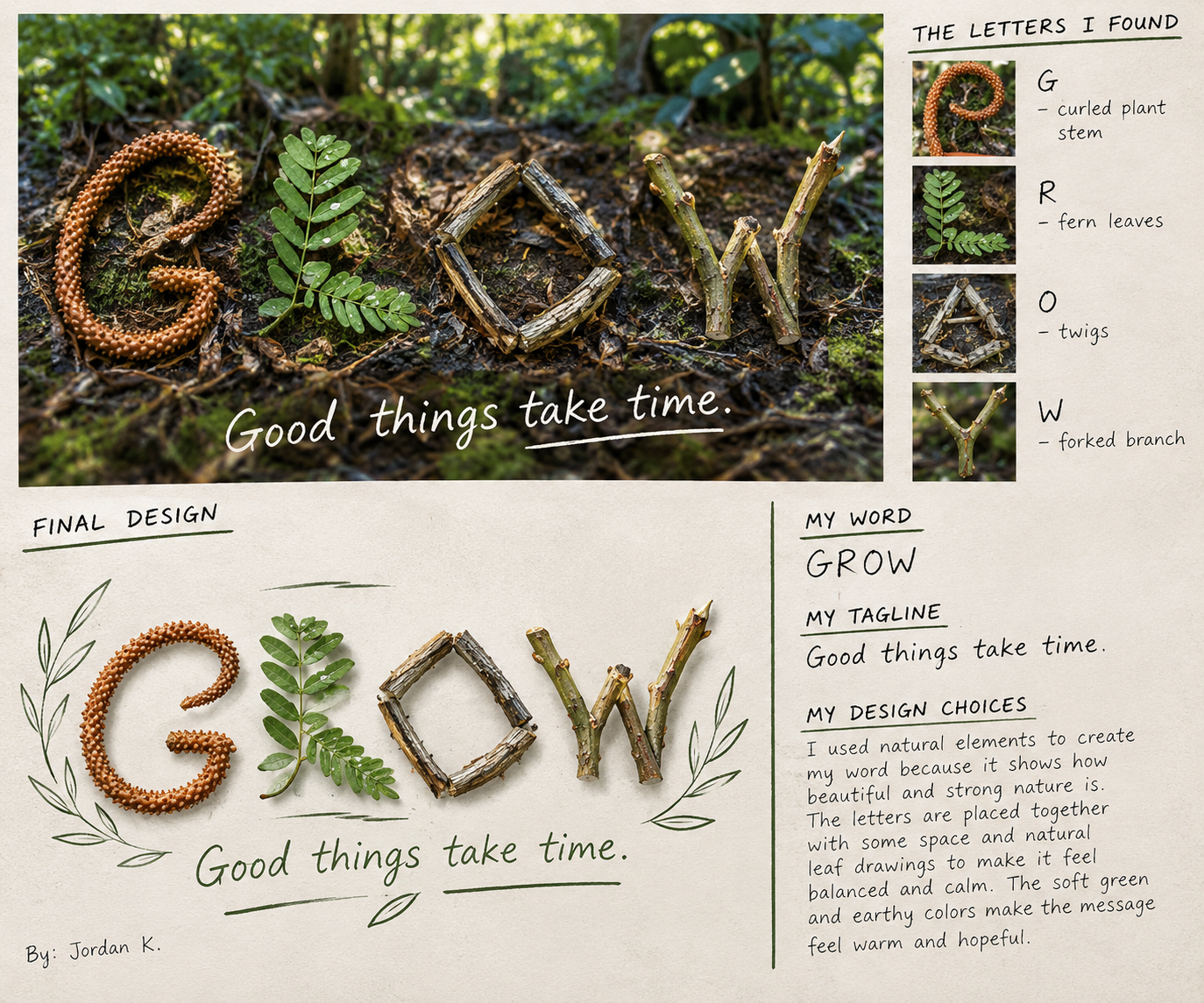
September 25, 2026 – Art Workshop Day! Nature’s Typography. See Wild Alphabet, Letters Found in Nature, ‘Play’ in Nature Letters and GROW Example.
September 21 – 25, 2026

September 21, 2026 – Review Section 4.2 PowerPoint. Discuss Volvo. Read 4.2 Social Responsibility pages 59 – 63. Complete Student Notes – Ethical Practices in Business Finance in iCEV. Complete Ethics and Government Agencies (link) and Does It Pay for Companies to do Good? (link, explain how to expand the window to read the article).
September 22, 2026 – Watch The Fall of Enron: The Company That Was Lying the Whole Time [9:01]. Complete the Ethical Practices in Business Finance Vocabulary Activity (iCEV) and Ethical Practices in Business Crossword Puzzle (link) for review. Complete Business Ethics Discussion Questions (link). Complete Enron Wordsearch (link).
September 23, 2026 – Watch and discuss Slavery in the Chocolate Industry [46:31]. Complete Ethics – Moral Dilemma and Plagiarism (handout). Complete The “Right” Thing – AI (link). Students work on any missing assignments.
September 24, 2026 – Watch and discuss Hundreds Die in Bangladesh Factory Collapse [5:38]. Complete Ford Motor Company Recall (link) and Writing Skills: Ethical Behavior (link). Complete the Ethical Practices in Business Finance Assessment (iCEV).
September 25, 2026 – Begin Chapter 5 Owning & Operating a Business. Watch Famous Failures Video. Handout Section 5.1 Terms. Review Section 5.1 Rewards and Challenges of Entrepreneurship PowerPoint. Read Section 5.1 pages 76 – 81. Complete Chapter 5 Section 5.1 Rewards and Challenges of Entrepreneurship Questions (link). Complete Section 5.1 Entrepreneurship Activity (link) and Section 5.1 Reading Activity (pdf).
(OR Answer questions 1 – 4 on page 81. Complete and Section 5.1 Entrepreneurship Activity (pdf).)
September 28, 2026 – Pass out and review Entrepreneurship, Trends & the Economy handout and Risks & Rewards handout. Complete Chapter 5 Business Week Case Study Questions. (link). Begin Famous Entrepreneur Project (see Student Example).
(Or Chapter 5 Business Week Case Study Questions (pdf). Case is on page 78.)
September 29, 2026 – Watch 12 Mistakes I Made My First Year as an Entrepreneur. Complete Will You Be Successful in Running Your Own Business Survey. Continue working on project.

September 14, 2026 – Begin Branding Basics. View the Branding Basics Vocabulary Handout under Instructional Materials. Watch the Branding Basics-What is Branding? segment and complete Assessment 1 – What is Branding?
September 15, 2026 – View the Branding Basics-Developing & Protecting Brands segment. Complete Brand Marketing Through the Coronavirus Crisis and Assessment 2 – Developing & Protecting Brands.
September 16, 2026 – View the Branding Basics-Brand Equity segment of the presentation and the Jane Converse Career Interview located in the drop down Select Media menu. Complete Assessment 3 – Brand Equity.
September 17, 2026 – View the Branding Basics-Expanding Brands segment of the presentation and the John Guthrie Career Interview. Complete Brand Expansion (link) and Assessment 4 – Expanding Brands.
September 18, 2026 – View the Branding Basics-Brand Personality segment and the Philip Mowry Career Interview. Complete Brand Personality (link) and Assessment 5 – Brand Personality.
September 21, 2026 – Review Constitution Week & Business. Complete the Vocabulary – Branding Basics and Final Assessment – Branding Basics.

September 14, 2026 – Under the Select Media option above the Video, choose the Graphic Design Basics: Color Theory (PowerPoint). Review the slides for Color Considerations. Complete Key Concepts III – Color Considerations and Check for Understanding III – Color Considerations.
September 15, 2025 – Under the Select Media option above the Video, choose the Graphic Design Basics: Color Theory (PowerPoint). Review the slides for Color Systems. Complete Key Concepts IV – Color Systems and Check for Understanding IV – Color Systems.
September 16, 2025 – Watch the Daniel Hutchinson Career Interview in iCEV. Complete Vocabulary – Graphic Design Basics: Color Theory and Final Assessment – Graphic Design Basics: Color Theory.
September 17, 2026 – Begin Graphic Design Basics: Typography. Review the Graphic Design Basics: Typography Vocabulary Handout and What is Type Student Handout in the Instructional Materials section. Watch the first video about Type Basics. Complete the Key Concepts I – Type Basics and Check for Understanding I – Type Basics.
September 18, 2026 – Art Workshop Day! Complete Type That Says It All. See Example.
Have a WordPress.com account? Log in now.