Accounting DE Assignments 2/10 – 2/14

February 10 – 14. 2025

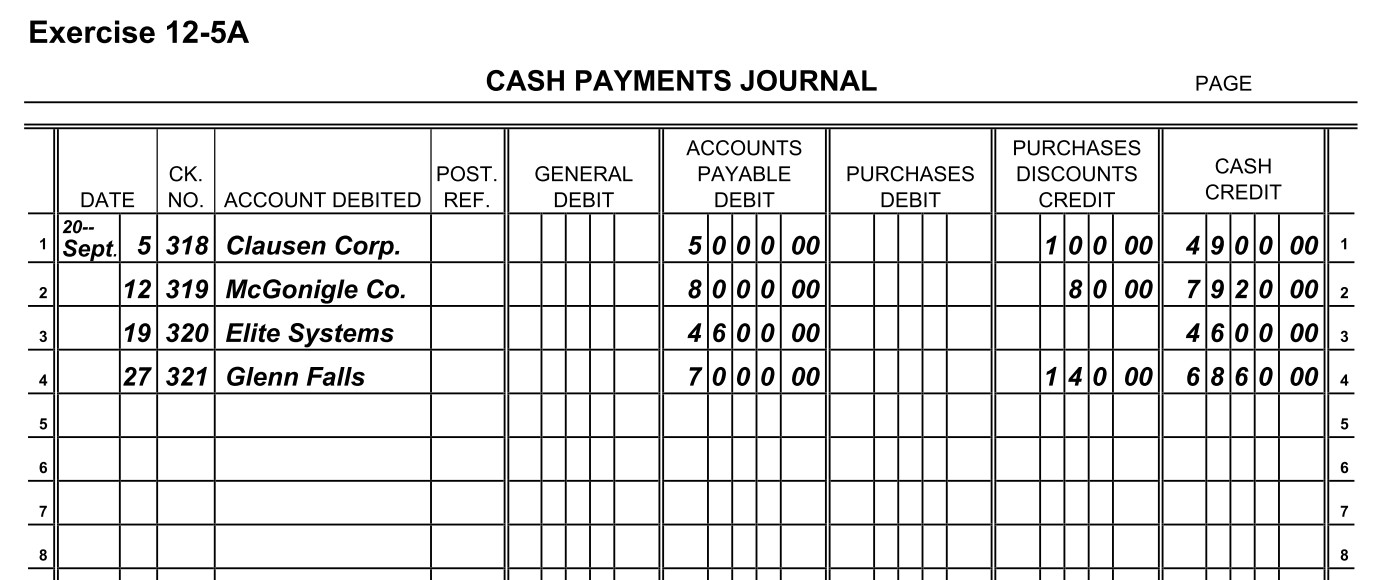
February 10, 2025 – Review Chapter 12 Sections 12.5 Cash Payment Journal (slides 25 – 31). Read Section 12.5 in your online textbook. Complete Chapter 12 Sections 12.5 Cash Payment Journal Questions and Exercise 12-5A Journalizing Cash Payments (self-check Solution).

February 11, 2025 – Complete Recording Transactions in the Sales Journal, Recording Transactions in the Cash Receipts Journal, and Recording Transactions in the Purchase Journal.

February 12, 2025 – School Closed for Flu.

February 13, 2025 – School Closed for Flu.

February 14, 2025 – No School.

February 17, 2025 – No School – President’s Day.

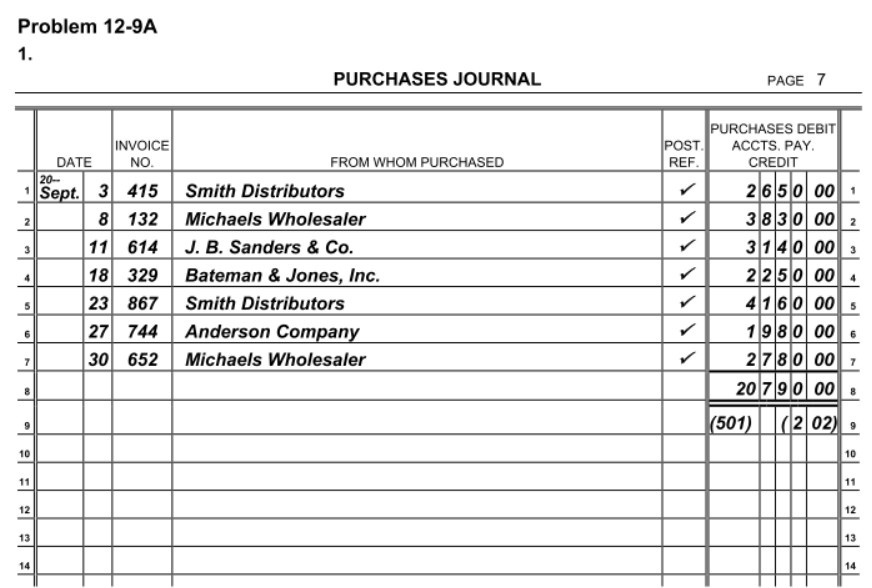
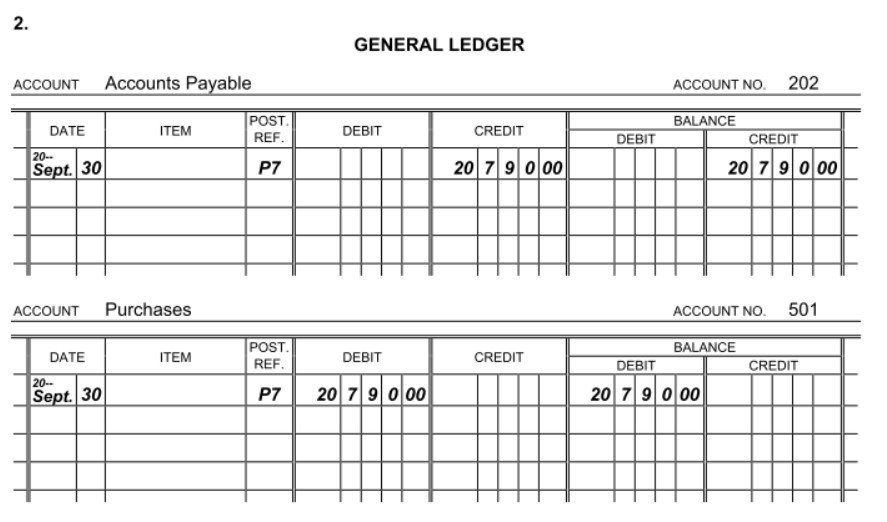
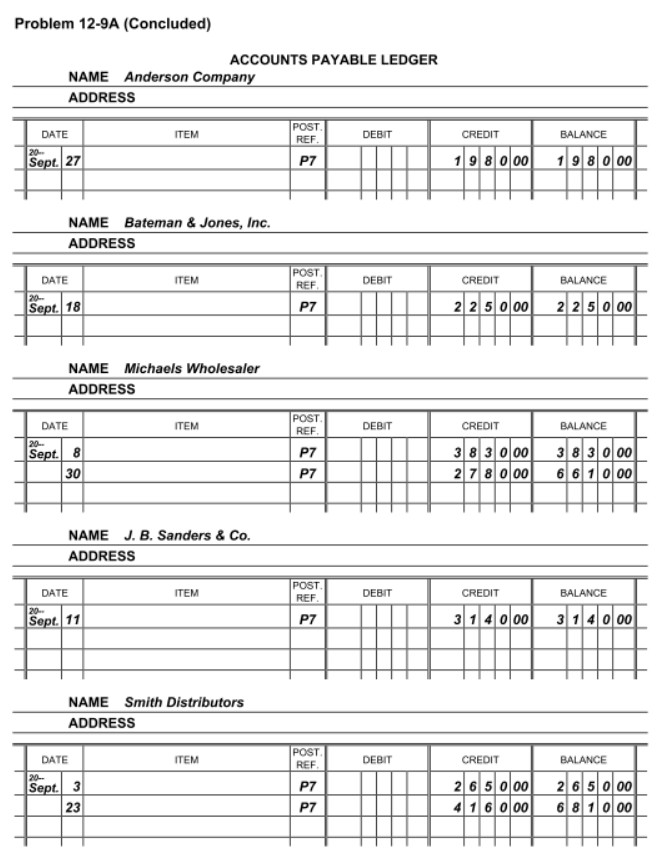
February 18, 2025 – Watch Special Journals to review. Review Quizlet for Chapter 12 Test. Complete Problem 12-9A Purchases Journal (self-check Solution 1, Solution 2a and Solution 2b). Complete Chapter 12 Review Questions.

February 19, 2025 Chapter 12 TCAT Test

February 20, 2025 – Begin Chapter 13 Accounting for Merchandise Inventory. Review Chapter 13 Sections 13.1 and 13.2 PowerPoint (slides 1-8),

February 21, 2025 – Review Chapter 13 Section 13.3 PowerPoint (slides 9 – 39).

Entrepreneurship 2/10 – 2/14

February 10 – 14, 2025

February 10, 2025 – Show the Résumé & Tips segment (slides 30-47). Complete Student Notes – Evaluating Applications & Resumes – Resumes & Tips and Assessment III – Resumes and Tips.

February 11, 2025 – Complete the Vocabulary – Evaluating Applications and Resumes in iCEV and Evaluating Applications & Résumés Crossword (handout) as review. Complete the Evaluating Applications & Résumés Final Assessment.

February 12, 2025 – Begin Managing People. Hand out the Managing People Vocabulary Handout which should be used as reference materials during the presentation. Show the Management
Overview
segment (slides 1 – 27) of Managing People. Pause at slide 18 to discuss additional traits which are valuable for a manager to possess. Students should complete the Student Notes – Managing People – Management Overview and Assessment I – Management Overview. Complete the Employee Wellbeing Discussion.

February 13, 2025 – Watch the Career Interview of Bill McKenzie. Remind students to use the Vocabulary Handout. Begin Managing People – Employee Management segment (Slides 28-50). Complete the Employee Experience Discussion.

February 14, 2025 – No School

February 17, 2025 – Watch the Career Interview of Angela Morgan. Finish Managing People –
Employee Management
segment (slides 51 – 64). Pause at slide 53 to discuss management strategies for dealing with difficult work personalities. Complete Student Notes – Managing People – Employee Management and Assessment II – Employee Management. Complete Problem-Solving Discussion.

February 18, 2025 – Show Managing People – Management Theories segment (slides 65-84). Complete Student Notes – Managing People – Management Theories and Assessment III – Management Theories. Complete Innovation Discussion.

February 19, 2025 – Complete the Vocabulary – Managing People and the Managing People Crossword as review. Complete Mentoring and Coaching Discussion.

February 20, 2025 – Complete the Managing People – Final Assessment. Complete any missing assignments.

How to Deal with Setbacks ?? online videos t$

Intro to Business & Marketing Assignments 2/10 – 2/14

February 10 – 14, 2025

February 10, 2025 – Show the Nonverbal Communication PowerPoint segment. Students complete Key Concepts IV – Nonverbal Communication and Check for Understanding IV – Nonverbal Communication. Complete Is or Are Worksheet.

February 11, 2025 – Show the Professional Communication PowerPoint segment. Students complete Key Concepts V – Professional Communication and Check for Understanding V – Professional Communication. Complete Me or I Worksheet.

February 12, 2025 – School Closed for Flu

February 13, 2025 – School Closed for Flu

February 14, 2025 – No school.

February 17, 2025 – No school, President’s Day

February 18, 2025 – Show the Communication & Society PowerPoint segment. Students complete Key Concepts VI – Communication & Society and Check for Understanding VI – Communication & Society. Complete Business Communication Word Search.

February 19, 2025 – Complete Vocabulary – Communication Styles and the Final Assessment – Communication Styles. Catch up on any missing assignments.

Share this:

Accounting I Assignments, 2/10 – 2/14

February 10 – 14, 2025

February 10, 2025 – Show slides 40 through 74 of the Microsoft Word 2019 Basics PowerPoint. Create Conference Schedule Notes in Microsoft Word.

February 11, 2025 – Prepare for APSU Speaker

February 12, 2025 – School Closed for Flu

February 13, 2025 – School Closed for Flu

February 14, 2025 – No School

February 17, 2025 – No School, President’s Day

February 18, 2025 – Watch Amazon’s Career AWS Data Center Tour 1: Uncovering Cloud Computing (played through Kahoot!). Complete AWS Data Center Tour Worksheet.

February 19, 2025 – Show slides 75 through 95 of the Microsoft Word 2019 Basics PowerPoint. Create Computer Learning System Letter or a Student Resume.

February 20, 2025 – Complete Microsoft Word Wordsearch and Vocabulary – Microsoft Word 2019 Basics and Microsoft Word Final Assessment. 

February 21, 2025 – Begin Business Mailing Procedures. Distribute the Business Mailing Procedures Vocabulary Handout and Student Handouts. Show the Mail segment of Business Mailing Procedures (Slides 1-14). Complete the Student Notes – Business Mailing Procedures – Mail and Assessment I. [REF02212024]

Accounting DE Assignments 2/3 – 2/7

February 3 – 7. 2025

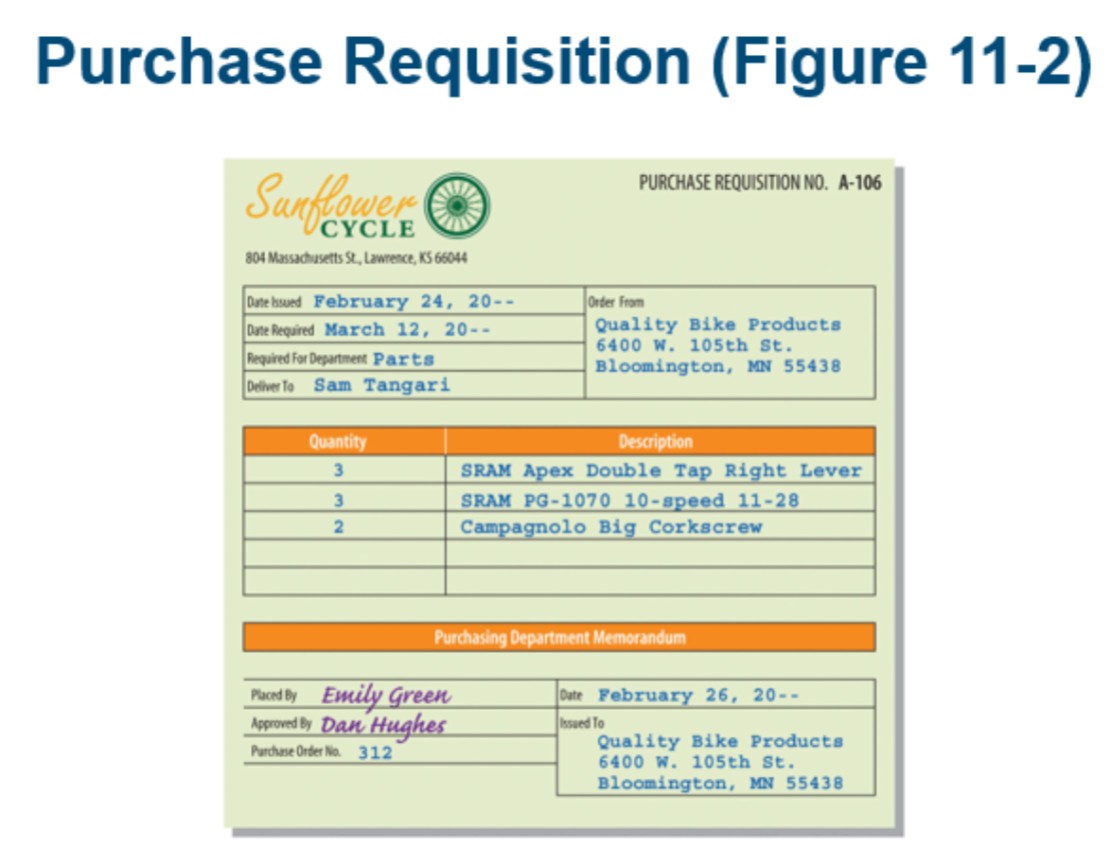
February 3, 2025 – Review for Appendix portion of slide show (slides 50-57) for additional information on recording purchases. Review Chapter 11 Quizlet. Complete Chapter 11 Purchase Requisition (see Example).

February 4, 2025 – Chapter 11 TCAT Test online.

February 5, 2025 – Begin Chapter 12 Special Journals. Pass out Special Journals Handout. Watch Special Journals Subsidiary Ledgers (16:02). Review Chapter 12 Sections 12.1 Special Journals and 12.2 Sales Journal (slides 1 – 13). Read Section 12.1 and 12.2 in your online textbook. Complete Chapter 12 Sections 12.1 Special Journals and 12.2 Sales Journal Questions and Recording Transactions in the Proper Journal Activity.

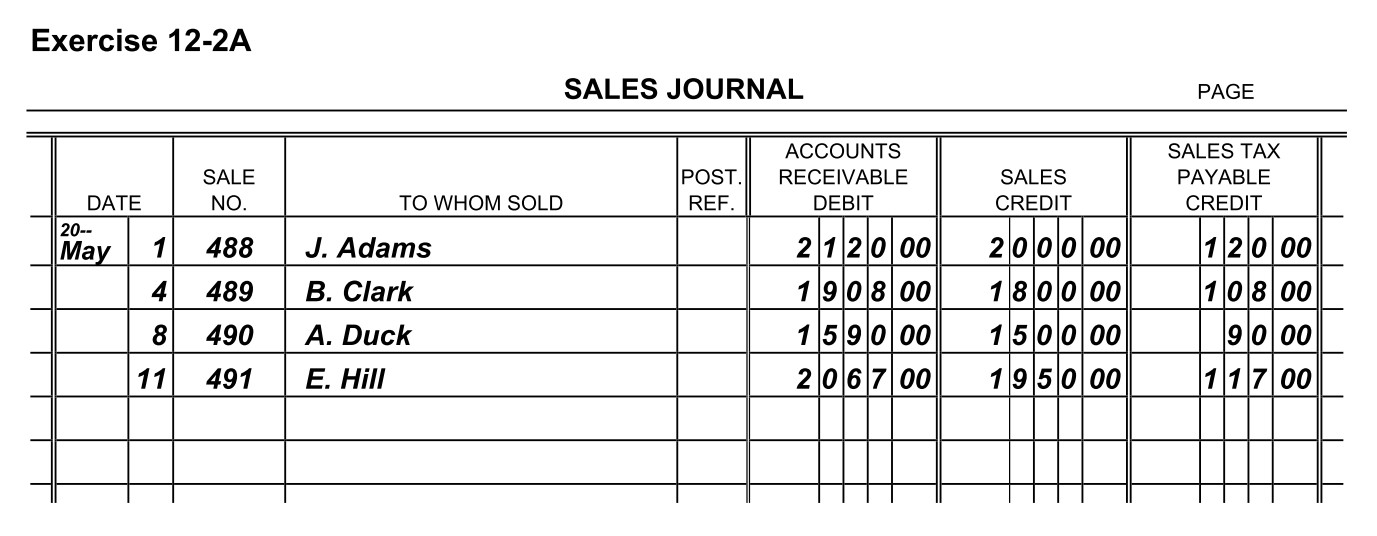
February 6, 2025 – Review Chapter 12 Sections 12.3 Cash Receipts Journal and 12.4 Purchases Journal (slides 14 – 24). Read Section 12.3 and 12.4 in your online textbook. Complete Chapter 12 Sections 12.3 Cash Receipts Journal and 12.4 Purchases Journal Questions and Exercise 12-2A Journalizing Sales Transactions (self-check Solution).

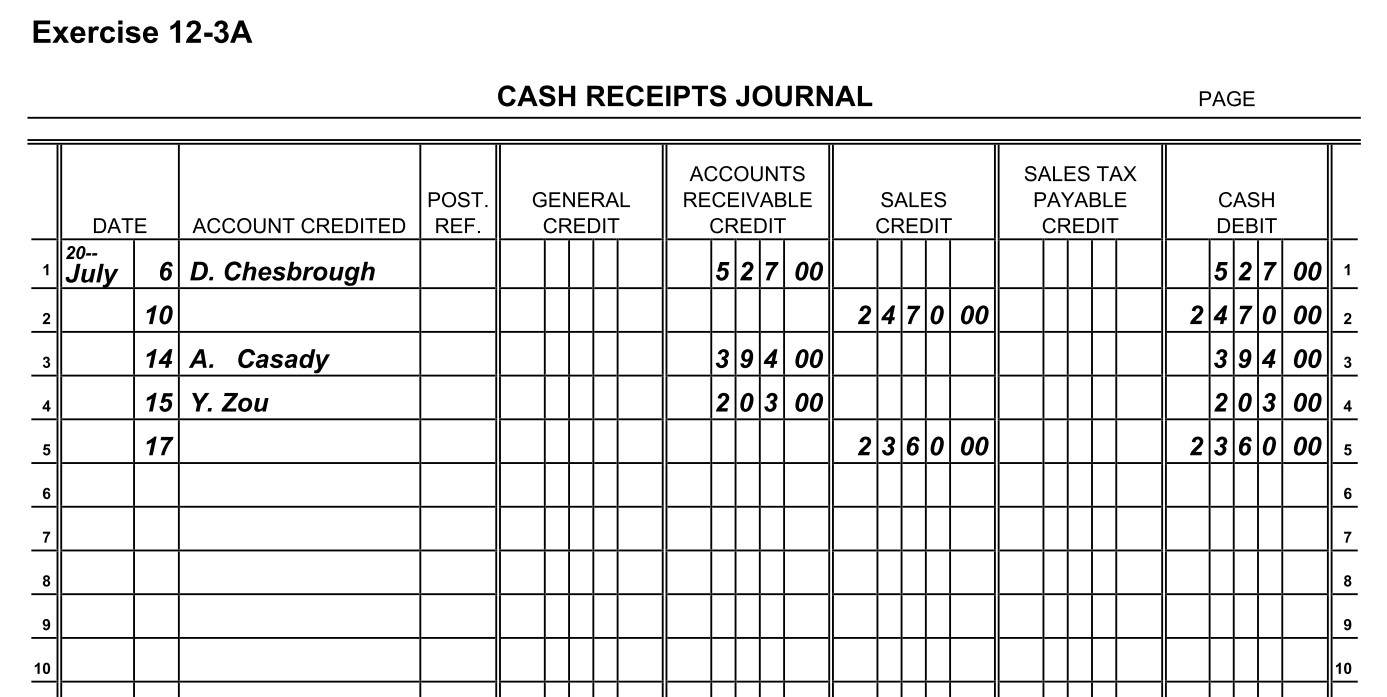
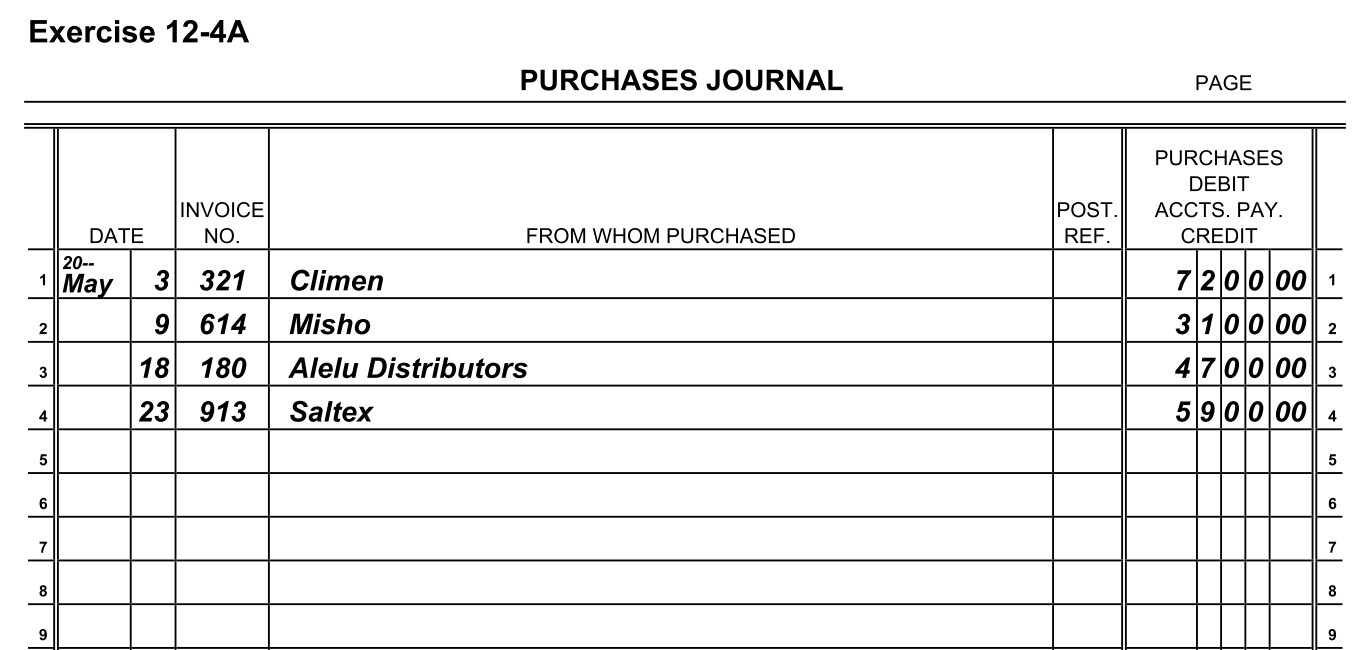
February 7, 2025 – Complete Exercise 12-3A Journalizing Cash Receipts (self-check Solution), Exercise 12-4A Journalizing Purchases Transactions (self-check Solution), and the Special Journals Word Search.

February 10, 2025 – Review Chapter 12 Sections 12.5 Cash Payment Journal (slides 25 – 31). Read Section 12.5 in your online textbook. Complete Chapter 12 Sections 12.5 Cash Payment Journal Questions and Exercise 12-5A Journalizing Cash Payments (self-check Solution).

Entrepreneurship 2/3 – 2/7

February 3-7, 2025

February 3, 2025 – Field trip outside.

February 4, 2025 – Complete the Entrepreneurial Communication Choice Project and the Vocabulary – Preparing for an Entrepreneurial Career: Communication in iCEV. Complete Professional Communication Matching.

February 5, 2025 – Complete the Business Communication Word Search and Preparing for an Entrepreneurial Career: Communication Final Assessment in iCEV.

February 6, 2025 – Review Invention from Necessity. Begin Evaluating Applications & Résumés. Hand out the Evaluating Applications & Résumés Vocabulary Handout which should be used as reference materials during the presentation. Show the Hiring segment of the presentation (slides 1-17). Students complete Student Notes – Evaluating Applications & Resumes – Hiring and Assessment I – Hiring in iCEV.

February 7, 2025 – Watch How to Hire Only the Best People – 7 Questions to ask Candidates (10:51). Show the Applications segment of the presentation (slides 18 – 29). Students complete Student Notes – Evaluating Applications & Resumes – Applications and Assessment II – Applications. Complete Legal or Not? (PDF version).

February 10, 2025 – Show the Résumé & Tips segment (slides 30-47). Complete Student Notes – Evaluating Applications & Resumes – Resumes & Tips and Assessment III – Resumes and Tips.

February 11, 2025 – Complete the Vocabulary – Evaluating Applications and Resumes in iCEV and Evaluating Applications & Résumés Crossword (handout) as review. Complete the Evaluating Applications & Résumés Final Assessment.

How to Deal with Setbacks ?? online videos t$

Accounting I Assignments, 2/3 – 2/7

February 3 – 7, 2025

February 3, 2025 – Begin Operating Systems & Networking. Hand out the Operating Systems & Networking Vocabulary Handout which may be used as a reference material during the presentation. Show slides 1 to 26 of the Operating Systems segment. Review UT Southern’s Bachelor of Business Administration in Management Information Systems. Students should read the handout, complete the Student Notes – Operating Systems & Networking – Operating Systems, and Assessment I.

February 4, 2025 – Distribute the Troubleshooting Network Issues Student Handout. Show slides 27 to 52 of the Networking segment. Review Columbia State’s Associate in Computer Science. Students should complete the Student Notes – Operating Systems & Networking – Networking and Assessment II.

February 5, 2025 – Show slides 53 – 71 of the Information Systems segment. Review UNA’s BBA in Computer Information Systems and their Scholarship of Distinction in Computing. Students should complete the Student Notes – Operating Systems & Networking – Information Systems and Assessment III.

February 6, 2025 – Watch Evolution Of Computers 1936 – 2020 (5:20), Students should complete Vocabulary – Operating Systems and Networking and Operating Systems Wordsearch. Students should complete the Final Assessment in iCEV.

February 7, 2025 – Begin Microsoft Word 2019 Basics. Pass out the Microsoft Word Vocabulary Handout is a list of terms used throughout the lesson. Watch Microsoft Word 2019 – Tutorial for Beginners. Review slides 1 through 39 of the Microsoft Word 2019 Basics PowerPoint. Read 12 Essential Microsoft Word Skills You Need Today (PDF Version if website not available) [REF02132024]

Intro to Business & Marketing Assignments 2/3 – 2/7

February 3 – 7, 2025

February 3, 2025 – Discuss Invention of Photography. Watch the History of American Photography Part 2 — “The Photographic Age, 1935-1959”, the portion of history where advertising takes off. Other parts for another time – History of American Photography – Part 1 “The Developing Image, 1900-1934” and History of American Photography Part 3 “Photography Transformed, 1960-1999”[REF01302024]

February 4, 2025 – Begin Southwest Communication Certification. Start Communication Styles in iCEV. Distribute the Communication Styles Vocabulary Handout. Show slides 1 to 15 of the Communication Process & Models PowerPoint segment. Review What Employers Want from New Hires. Students complete the Communication Process Diagram Activity in iCEV. Complete There, Their or They’re Worksheet.

February 5, 2025 – Show slides 16 to 36 of the Communication Process & Model PowerPoint segment. Students complete Key Concepts I – Communication Process & Models and Check for Understanding I – Communication Process & Models. Complete Your or You’re Worksheet.

February 6, 2025 – Show the Styles Overview PowerPoint segment (slides 37-47). Students complete Key Concepts II – Styles Overview and Check for Understanding II – Styles Overview. Complete Than or Then Worksheet.

February 7, 2025 – Show the Listening Process PowerPoint segment (slides 48-58). Students complete Key Concepts III – Listening Process and Check for Understanding III – Listening Process. In groups, complete Verbal Instructions Activity. Complete Its or It’s Worksheet.

February 10, 2025 – Show the Nonverbal Communication PowerPoint segment. Students complete Key Concepts IV – Nonverbal Communication and Check for Understanding IV – Nonverbal Communication. Complete Non-verbal Communication Brainstorming and Is or Are Worksheet.

February 11, 2025 – Show the Professional Communication PowerPoint segment. Students complete Key Concepts V – Professional Communication and Check for Understanding V – Professional Communication. Complete Me or I Worksheet.

February 12, 2025 – Show the Communication & Society PowerPoint segment. Students complete Key Concepts VI – Communication & Society and Check for Understanding VI – Communication & Society. Complete Business Communication Word Search.

February 13, 2025 – Complete Vocabulary – Communication Styles and the Final Assessment – Communication Styles. Catch up on any missing assignments.

February 14, 2025 – No school.

Share this:

Intro to Business & Marketing Assignments 1/27 – 1/31

January 27 – 31, 2025

January 27, 2025 – Work on Window Display Project

January 28, 2025 – Work on Window Display Project

January 29, 2025 – Work on Window Display Project

January 30, 2025 – Turn in Window Display. Watch How Advertising Rewires Kids’ Brains. Review Slides 111 – 123 of the Influences on Advertising segment. Examine Advertisements. Complete Student Notes – Advertising for Business – Influences on Advertising and Advertising for Business Assessment V. Complete Advertising Tricks.

January 31, 2025 – Watch The Psychology Behind Good Advertising. Complete Advertising for Business Final Assessment VI. Complete 11 Places for Free Advertising Word Search and Analyze Advertising Effectiveness. Make-up any missing work.

February 3, 2025 – Watch the History of Photography. [REF01302024]

Share this:

Accounting I Assignments, 1/27 – 1/31

January 27 – 31, 2025

January 27, 2025 - Watch The History of Telecommunications and AT&T: The Company Behind the Telephone. Complete the Vocabulary – Telecommunication Basics and the Telecommunication Basics Assessment in iCEV.

January 28, 2025 – Begin Introduction to Computers. Hand out the Introduction to Computers Vocabulary Handout and Student Handouts (Computer Uses and Handheld Computers). Show the Introduction, Types of Computers and Computer Hardware segments (first 3 videos – 19 minutes). After viewing the segments, have students read the handouts, complete the Internal Components Activity in the “Interactive Activities” section and Digital Devices Worksheet (handout).

January 29, 2025 Show the Computer Software segment (8:33 minutes). Instruct students to complete the Software Application Activity (Part A). Provide students with instructions for the Ergonomics for Computer Users Project.

January 30, 2025 – Show the Computer Setup & Care segment (18 minutes). Instruct students to complete the Problem Situations Activity (part A) and Introduction to Computers Vocabulary in iCEV. Distribute the Computer Security Activity and allow students to work.

January 31, 2025 – Watch Top 10 BEST Career Paths for Computer Science Majors (10 minutes). Complete the Introduction to Computers Worksheet and the Assessment. [REF02062024]